Showing posts with label Facebook. Show all posts

Friday, September 25, 2015

Friday Facts: 10 of the latest surprising and revealing studies on social media

For today's Friday Fact's I'm sharing an article produced by The Next Web news regarding 10 of the latest surprising and revealing studies on social media. This article includes a lot of interesting stats with accompanying charts and graphs to back up the data as well as links to the original articles where the studies were pulled from.

For example, did you know, according to Chartbeat, late afternoon and evening is the best time to share things to get interaction from users?

Or, another example, Instagram users are more engaging than Facebook and Twitter users.

And ramp up your video team - surveys show social media marketing is ramping up in YouTube, LinkedIn and Twitter.

Read all the details on these facts and seven more in the article here: http://thenextweb.com/socialmedia/2015/07/09/10-of-the-latest-surprising-and-revealing-studies-on-social-media/?utm_content=bufferc2af2&utm_medium=social&utm_source=twitter.com&utm_campaign=buffer

Happy Friday!

Tuesday, September 1, 2015

Tuesday Tips: If you do Direct Sales, Consider a Facebook Group

While the title may sound counter-intuitive to my normal posts talking about Facebook Pages and such, Facebook groups are a great way to market and insure a lot higher rate of viewing than many pages do. If you are an author or a direct sales person (like Avon, Scentsy, Jewelry in Candles, etc.) groups may be of benefit to you.

Keep in mind, I'm not saying to go solely with a group - a page will help as well, but having a group will also help spread the word and increase interaction.

Facebook Group have a distinct advantage in that members can chose to receive direct notifications about updates to the group. They may receive daily updates or updates only from specific members, such as you. You can also limit the group to where only you can create posts and your clients can respond to them.

Facebook groups are great for games and contests as well as special sales.  If you haven't considered a group, check some of them out - you might be surprised how useful they can be.

Tuesday Tips are a series of tips released on Tuesday each week regarding a hint or tip to help you manage and market your Facebook presence better.  You can find all the Tuesday Tips by clicking on the Tuesday Tips tag below.

Thursday, August 6, 2015

Thursday Tutorial: How to enable Two-Step Authentication/Additional Security

If you are an admin or an editor of a Facebook page(s), it's important to have your account secured. Many times accounts are taken over and porn or other malicious material is posted to your brand's Facebook page causing a headache for you and your other admins. Worse - you can be locked out from your account and have a hard time getting back into it.

This is why we advise all page owners and editors to enable and maintain Two-Step Authentication and check security on their Facebook accounts.

Enabling Two-Step Authentication is easy and helps keep your account more secure. To enable Two-Step Authentication, be sure to have the Facebook app installed on your smart phone - they used to just text you the codes but now they force you to use the code generator on the smart phone instead.

Login to your Facebook Account. Click on the down arrow to generate the menu that looks like this:


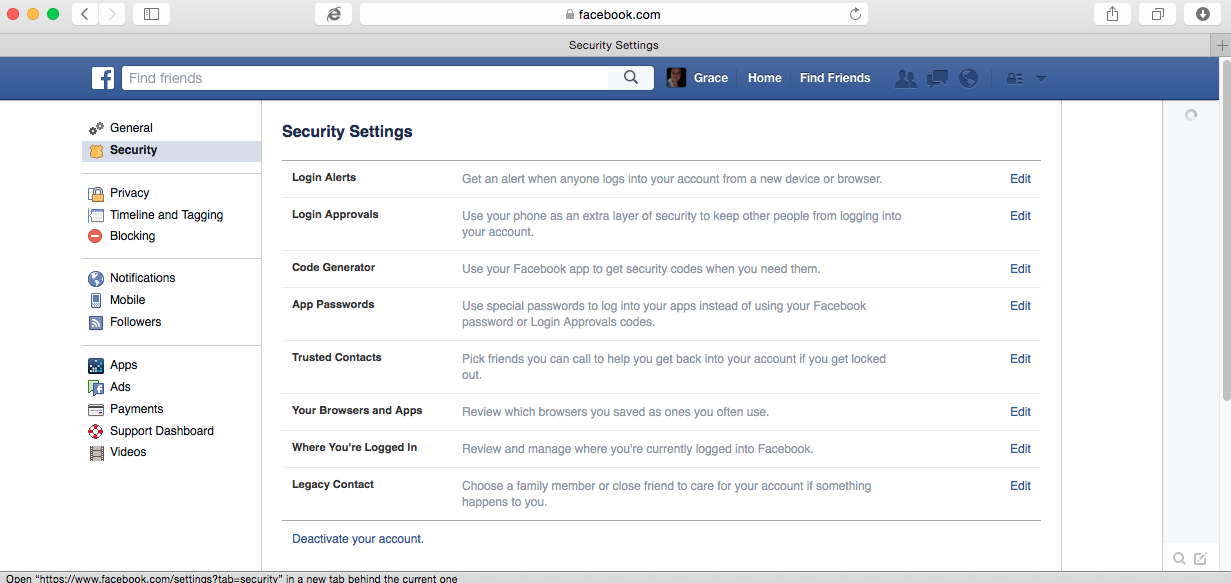
Click on the Settings Option toward the bottom of the menu. That will create a page with your generic account settings and a bunch of options on the left. Click on "Security" on the left to create a page like this.


This menu controls all of your security settings. We'll go over other options in the menu in future tutorials. For this tutorial we're interested in Login Approvals. This prevents someone from logging into your account without an access code from a computer/phone different from the one(s) you regularly use.

Click on Login Approvals to get this screen. 


Check the  box to the left of "Require a security code...." and then click Save changes. This will generate a pop up window like this:


Click Get Started. That will direct you to this screen:

Chose your type of phone and click continue.


If you haven't installed your Facebook app on your smartphone app, you should do so now because you can't proceed from here if you don't. If you have it installed, or once it's installed, follow the instructions on this screen then hit continue.


Type in the code you were given and click confirm. Once confirmed you should see a screen like this:
(note: my info is blurred out)

If Save Changes is available, click save and Two-Step Authentication will be enabled.

Keep in mind, anytime you login from a new browser or if you clear cookies, you will have to have your phone available to be able to sign in. But this method helps protect you from any potentially malicious take overs.

Friday, July 3, 2015

Friday Facts: Facebook tweaks algorithms again based on new information

Every time we turn around it seems like Facebook is changing the algorithms and we, as page owners, feel like we're getting shafted by the changes. However, this time it sounds like Facebook is tweaking the algorithms to our favor - whether or not it really has will take a few months for us to see, but it does sound promising.

Facebook has realized that just because people don't like, comment or share doesn't mean that an article isn't worthy to be in the news feed. It could simply mean that the person didn't feel like doing any of those things at that time, etc.

This article, over at The Guardian, explains it more in detail and what the changes could mean for page owners: http://www.theguardian.com/technology/2015/jun/15/facebook-tweaks-news-feed-algorithm-time-spent

Now we get to wait and see if this actually improves views or not.

Wednesday, January 28, 2015

Wednesday Words: Extended circles

Early last year one of the words we defined as part of the Social Media Marketing Wednesday Words was Circles.  Circles is how you arrange your connections within Google +.  You can group your connections into circles with which you then select the names of the circles you want to share your posts with.

But there's also extended circles on Google+.  Extended circles includes not only the people in your circles but the people who are in your circles' circle (aka a friend of a friend can see your post).

With Google+ you can chose for your post to only be shared with your circle or if you want people in the extended circles to be able to see your post.  When you chose to let extended circles see your post, your post could appear on their news feed instead of in just your friend's news feed.

Something to keep in mind when sharing with circles and extended circles on Google+.

Wednesday Words are a series of definitions released on Wednesday each week regarding a word found specific to Facebook's social media platform, or may be a generic word dealing with social media. These definitions are to help provide you with a better understanding of common and uncommon terms associated with Facebook and social media. You can find all the Wednesday Words by clicking on the Wednesday Words tag below.

Tuesday, December 30, 2014

Tuesday Tips: Planning for the New Year

Do you have a page but haven't done much with it?  Or perhaps you haven't gotten around to making a page for your business?  What about your Twitter account, Instagram, Pinterest Business account or LinkedIn Business Profile?  Once you've narrowed down the social media outlets you want to participate in, now is the perfect time to to settle down and start creating.  This will allow you to launch your band on social media platforms with the new year and see your stats from the beginning of the year.

The important thing to remember is that likes, follows, etc., start small and slowly spread.  Don't be shy about sharing a link to your social media accounts on your personal Facebook and LinkedIn walls and asking people to like and share it.  Don't be shy about inviting everyone on Facebook that you think would be interested in the page.  And don't be shy about emailing invites either.  A great way to let people know your business can be found on social media is to add it to the signature of your email as another way to connect with you.

While you can track your statistics for any time period, starting with the new year will give you an easy launch date to remember and measure the year's progress by.  It also gives you an opportunity to start with a fresh social media plan for the new year.  The new year is only a few days away.  If you can't hit the Jan. 1 deadline, target it for sometime in the month of January.  And keep in mind - plans need to be flexible and changing.

Best of luck and Happy New Year to everyone!

Tuesday Tips are a series of tips released on Tuesday each week regarding a hint or tip to help you manage and market your Facebook presence better.  You can find all the Tuesday Tips by clicking on the Tuesday Tips tag below.

Thursday, December 25, 2014

Merry Christmas to All

As mentioned in yesterday's Wednesday Words, with today being Christmas Day and spending time with family (and video games), we will not have a Thursday Tutorial due to the holiday.  The same will be true for next week with New Years Day.  We hope everyone is enjoying time off, if they are fortunate enough to not be working, and having a fun and enjoyable holiday season.

Merry Christmas!


Friday, June 27, 2014

Friday Facts: Interesting Facebook Statistics

I was reading through a couple sites this past weekend and came across a site that promises to teach you "the secret system Facebook Marketers are Using."  Naturally they want you to pay a lot for their course that guarantees you'll see more lead generation, etc., but I've always been highly skeptical of such promises - especially when it takes FOREVER to get to the bottom of the page to find out how much it costs - then see, as I quickly scroll, they cover a number of the same topics that are posted on my blog and similar blogs.

Either way, this isn't a rant about those types of sites, but rather, the useful stats one of those sites provided.

  • Facebook is currently the largest social network with over 1.19 Billion Active Monthly Users.
  • 93% of marketers use social media for their business.
  • Facebook has 728 million daily active users.
  • Facebook Like and Share Buttons are viewed 22 million times a day.
  • There are over 50 million Facebook pages.

Source: http://www.fbinfluence.com/?hop=pmwatch

Since I found those stats interesting (and easy to find) I figured I'd share them with you, as well as a link to the source.

Keep in mind, I always recommend starting out with one or two forms of social media and seeing what works for your brand.  Because of these statistics and personal experience, I encourage you to make Facebook one of the forms of social media you set up first.

Happy Friday!

If you have anything you would like us to share on Fridays or Mondays, please don't hesitate to contact me via Google+ or Facebook!

Tuesday, May 6, 2014

New Facebook Page Layout Coming Soon

If you're one of the lucky pages, you've already been converted over to the new Facebook page layout, if not, you may still have to wait a few weeks.

Personally, I like the new way pages look and you have a bit more control over things as well.

Facebook actually has a post that talks about all of this and how it is streamlined to help admins as well.

Check it out here:  https://www.facebook.com/business/news/A-Streamlined-Look-for-Pages

Wednesday, April 23, 2014

Wednesday Words: Klout

Today's word is something that measures your "influence" based on the number of likes, comments and shares as well as followers and some other matrixes.  The word is "Klout."

Klout is a platform with which you can use to measure your amount of influence in the world of social media.  It also gets you perks from various companies who are hoping by sending you items, you'll post about them and others will purchase them based on the fact you're influential.

Klout is, by no means, needed by most folks, but it does provide some interesting insight.  You can link all of your social media and other networking sites to it - including Tumblr, LinkedIn, Twitter, YouTube, Instagram and more - to get a more accurate reading of how influential you are.  You can also use Klout to post to your various social media outlets - and it posts it to Klout too.

Klout has changed a lot since it first started, but many things remain the same.  You can "grant" Klout to friends who are members of Klout in various topics - for example my main topics have been Gaming, Journalism, Social Media and Video Games for a while now.  Some folks have other topics they have Klout in.

Klout is easy to sign up for and you can sign up and sign in with either Facebook or Twitter.

Learn more about Klout by visiting www.klout.com.

Wednesday Words are a series of definitions released on Wednesday each week regarding a word found specific to Facebook's social media platform, or may be a generic word dealing with social media.  These definitions are to help provide you with a better understanding of common and uncommon terms associated with Facebook and social media.   You can find all the Wednesday Words by clicking on the Wednesday Words tag below.

Monday, March 31, 2014

Facebook News: Top 5 Questions about the Update to Pages

Facebook is making another change to how pages are laid out - just like your Timeline and news feed has recently changed look.  The business side of Facebook has released a useful Top 5 Questions about the changes.

The questions (and answers) include:

  1. What information will appear in the left-side column of my Page?
  2. Where will my apps appear?
  3. Where can I view messages?
  4. Will other Pages know I’ve added them to my Pages to Watch list?
  5. When will I have access to the updated design for Pages?

Wednesday, February 26, 2014

Wednesday Words: Circles

Todays's Wednesday Word is a word that, thus far, is only associated with Google+ (G+): Circles.

Circles is how you arrange your connections within Google +.  You can group your connections into circles with which you then select the names of the circles you want to share your posts with.

You can also put people into multiple circles.  I have circles for VIPs, close friends, family, acquaintance and industry contacts.
The interesting thing to note though is while Circles can affect your personal profile on Google +, it can also affect your business page there as well.  People can add your page to circles (which allows them to see some of what you publish), but for them to see more, you have to add them to your page's circles.

And, just like Facebook, this isn't an automatic step.  You have to do this yourself.

Keep in mind, if you want certain articles you post to your page to target certain members of your audience and not others, be sure to put them into specific circles, then select that circle for the item to be posted to.

In the coming weeks, we'll be touching on Google + and how to use it as Social Media along with Facebook, Twitter and LinkedIn.

As always, I welcome questions on any of the social media platforms and look forward to answering questions of my readers.

Wednesday Words are a series of definitions released on Wednesday each week regarding a word found specific to Facebook's social media platform, or may be a generic word dealing with social media.  These definitions are to help provide you with a better understanding of common and uncommon terms associated with Facebook and social media.   You can find all the Wednesday Words by clicking on the Wednesday Words tag below.

Wednesday, February 19, 2014

Wednesday Words: Avatar

Avatar, not to be confused with the movie with blue aliens, is an image used to represent yourself on a forum, Twitter, Facebook, etc.  It can be a picture of yourself, a logo you like or any number of things that represents something about you.

People new to social media are sometimes confused by the term avatar.  For Twitter and Facebook, the avatar should be your company logo - that way the Facebook/Twitter post is easily recognizable while enforcing and enhancing branding of the name and logo.

The Avatar is what people will see and associate with you when scanning through their social media - so you want it to be identifiable and recognizable.

If you are unsure what you should do for your page's Avatar or your Twitter Feed Avatar, I highly suggest looking at other, similar Twitter Feed and Facebook pages, then go from there.  If you still aren't sure, consult with others.  You'd be surprised what people will suggest that just might work.

Wednesday Words are a series of definitions released on Wednesday each week regarding a word found specific to Facebook's social media platform, or may be a generic word dealing with social media.  These definitions are to help provide you with a better understanding of common and uncommon terms associated with Facebook and social media.   You can find all the Wednesday Words by clicking on the Wednesday Words tag below.

Wednesday, February 12, 2014

Wednesday Words: People Talking About This (PTAT)

Once your Facebook page exceeds a certain number of users - I believe it's 25 or 30 - and you aren't listed as a Community Page, you get to see and make use of Page Insights.  One of the statistics you will see most often is "People Talking About This" which is today's word.

You can find the "Talking About This" statistic under the name of your page - once you are past the admin area - to the right of your page avatar.  See screenshot below with the # Talking About This circled in red.


So, for this page I maintain and am sole poster of content to, I have 137 likes and 4 people talking about my page.

But what does that mean exactly?

This statistic shows the number of people actively engaging on your page by commenting, sharing, liking, etc.  It also includes people who comment on things shared from your page's wall to other walls (because they are talking about it).  It also includes people who share your page in general and encourage people to like it.

It's a good number to pay attention to if looking at the insights page becomes overwhelming.  Knowing that people are talking about your page is always a good thing.

Remember the adage: Any publicity is good publicity.

Are there any words you hear in relation to social media that you want more information about?  Or questions you have about any of the words, tips or tutorials I post?  I want to hear from you.  I'd love to be able to expand on things or answer your questions in upcoming blog posts.

Wednesday Words are a series of definitions released on Wednesday each week regarding a word found specific to Facebook's social media platform, or may be a generic word dealing with social media.  These definitions are to help provide you with a better understanding of common and uncommon terms associated with Facebook and social media.   You can find all the Wednesday Words by clicking on the Wednesday Words tag below.

Tuesday, February 4, 2014

Tuesday Tips: Schedule Posts

One of the simplest things you can do is to schedule posts for upcoming events, sales, or other topics to automatically post on your Facebook page.  It takes a little bit advanced planning, but is well worth it in the long run.

Facebook has a nice system set up for scheduling posts and a recent upgrade to the system made it even easier.  You can tell it what day and time to post the blurb, image, video, or whatever.

If you're more tech savvy, you can schedule posts using Hootsuite to post to multiple social media sites.

If you want to learn how to schedule posts, check out this week's Thursday Tutorial, which will show you how to schedule posts via Facebook - we'll do Hootsuite at a later time.

Tuesday Tips are a series of tips released on Tuesday each week regarding a hint or tip to help you manage and market your Facebook presence better.  You can find all the Tuesday Tips by clicking on the Tuesday Tips tag below.

Wednesday, January 29, 2014

Wednesday Words: Edge Rank

Last week we talked about algorithms used by social media sites to figure out how many of your users see what percentage of your posts and briefly mentioned Edge Rank and how that was Facebook's way of determining not only who sees content from your pages, but how many friends see what you post.

This week, we'll talk a bit more about Edge Rank and how it affects you and your profile and your page(s). Important note: Facebook has discontinued using "Edge Rank" but several of the things involved with pages and profiles still use the terms found within Edge Rank, thus the article on it.

Pages and profiles that have more engagement (likes, comments, shares, etc.) will appear more often and more permanently in feeds that have the page liked than pages and profiles which have less engagement.  Most articles agree that there seem to be three factors that way into the Edge Rank algorithm: Affinity, Weight and Time Decay.

Affinity is based on how friendly you (or your page are).  Or, to better define it, how much your friends/users "like" you.  The more you interact with your friend(s) or page(s), the more often the friend's (or page's) posts will appear in your news feed.  And vice versa.  For pages, interacting with your users and encouraging interaction and engagement is a necessity.  Remember, engagement can be as simple as "liking" something a friend or page posts, or liking comments on your page.

Weight, according to my sources below, is the likelyhood of something being shared.  They mention links, photos and videos being among things that have more weight and are seen more in wall feeds,  but I have noticed lately that links are among the lowest number of things seen by our users.  Posts without links and posts without images that are short and ask a question seem to have more weight than images or links.   So it's very possible that, once again, the algorithms have changed.

Time decay refers to the likelyhood of people seeing older posts when newer posts are available for them to see.  The older a post is, the less likely it is for someone to see it.

Several sites, including my last source linked below, believe that Edge Rank is dead and cite the fact that Facebook hasn't used the term in some time as well as recent interviews with Facebook that discuss how news feed items appear.

Even if it is true, they do acknowledge that the three factors (affinity, weight and time decay) still play factors in whatever ranking system Facebook is using.  Which means knowing and understanding the terms used with Edge Ranks is still valuable to working with your page.

For more information, check out the links below under sources.

Wednesday Words are a series of definitions released on Wednesday each week regarding a word found specific to Facebook's social media platform, or may be a generic word dealing with social media.  These definitions are to help provide you with a better understanding of common and uncommon terms associated with Facebook and social media.   You can find all the Wednesday Words by clicking on the Wednesday Words tag below.

Sources: 

  1. Why Your Facebook Page Gets Little Traffic: http://www.businessdirect.com/why-your-facebook-page-gets-little-traffic-and-what-you-can-do-about-it/
  2. What is Edge Rank? http://www.whatisedgerank.com/
  3. EdgeRank: http://edgerank.net/
  4. EdgeRank is Dead: http://marketingland.com/edgerank-is-dead-facebooks-news-feed-algorithm-now-has-close-to-100k-weight-factors-55908

Wednesday, January 22, 2014

Wednesday Words: Sharability

Today's word - sharability - applies to all social media and isn't specific to just one or another.

Almost everyone on the internet recognizes the "Share This" icon that appears on websites and our smart phones, encouraging us to use one of the many ways to share something we like with others.  Sharability is the "measurement" of how engaging a post is which is likely to cause it to be shared.

This means, how likely are your fans/users to retweet/share/comment on your posts, videos and images to their fans/followers/wall?

Having sharable content is important for user engagement and gaining new users.  Keep in mind, it's not an invitation to create things that are likely to cause people to spam it, but sharing things genuinely of interest to others.

Ultimately, when creating posts, see what types of posts your users share more often.  It may take a month or two to figure that out, but once you do, you'll know what combination of posts to make each week to help raise the amount of likes your page has and how to increase the visibility of your page/tweets/content.

Wednesday Words are a series of definitions released on Wednesday each week regarding a word found specific to Facebook's social media platform, or may be a generic word dealing with social media.  These definitions are to help provide you with a better understanding of common and uncommon terms associated with Facebook and social media.   You can find all the Wednesday Words by clicking on the Wednesday Words tag below.

Thursday, January 16, 2014

Thursday Tutorials: Creating Your Page

The previous tutorials - prior to missing an article for last week - covered how to find the "Create a Page" buttons as well as how to chose the category your page falls into.  Today, using this blog as an example, I will walk through how to create a page for a website/brand/product.  The process is pretty much the same for the other categories - but if specific tutorials for each category are wanted, I will need to be able to create a page for a specific category.

That being said, we'll start with the very first step, finding and clicking on the click page button - as seen below.


Once you click that +Create a Page button, this page below will pop up where you can chose the category you want your page to be in.  If you are confused on this, please check the article found here for additional information as to what types of pages go where.


Since I'm creating a page for my blog (aka Website), I selected the Brand or Product category from above.  Then in the drop down menu for selections there, I chose Website, as seen below.


After that is selected, I typed in (what was then) the name of the blog (as seen below).


Once I hit the "Get Started" button, that's when I discovered I had to change the name of my page.  Long story short, there is some programing within page creation which will prevent you from creating pages with certain names.  Using the term "Facebook" in a page name is forbidden - which should have been an "oh duh" moment for me, but I hadn't really considered it before I started the blog.

If you hit the "Get Started" button and a red error message pops up similar to the one below, click on the "Learn More" to figure out what you might have done wrong, then change the name of your page - as I did.


Thankfully, Social Media Marketing: Tips and Hints was permissible and available, which is why the blog's address and name changed to that.  Finding the name was allowed, hitting "Get Started" Takes you to this next page.

This was my first draft of what I put in the description area.  You are limited to a certain number of characters, so be sure to be concise about what your page is for.  I redid this and ended up with a shorter blurb and a way to add in my blog address.  Note: If you put in a web address, it will automatically link in the page's description - a great way to hopefully get people to click to your site if they stumble across your page.

Now, I failed to get screenshots of the next two steps, but they are relatively easy to walk through.

Your profile picture, or avatar, is the image that will be seen in the feed of folks who liked you.  Facebook requires the size to be at least 180x180 in size, but you can use almost any size, just as long as it resizes right and looks good in the square.  Facebook has options for you to select what you want people to see if the image doesn't resize right.  If all else fails, I strongly encourage you to spend time on selecting your image and making sure it looks right.  

Most importantly, don't worry if it doesn't look right or you decide that's not the image you want to use.  You can always change it after the page is initially created.

Once you have the image uploaded and selected, you move on to the final phase, adding your new page to your Favorites section.  That will make your page show up as seen below.


Once that is done, you hit the final button and it will take you to a pretty sparse page, but it's been created and your name has been saved.

Our next article will continue in the same theme of this page, but with customizing your page that you just created.

Thursday Tutorials are a series of tutorials designed to help people who may not be as Facebook savvy as other people.  Some tutorials will be targeted towards newbies to the social media world, others will include tutorials for more advanced users.  Thursday Tutorials are written for the layman and are designed with everyone in mind.  You can find all the Thursday Tutorials by clicking on the Thursday Tutorials tag below.

Wednesday, January 15, 2014

Wednesday Words: Algorithms and Social Media

Every so often when you come across articles explaining why your page posts only reach a certain percentage of users who like your page, the term algorithms pops up and are left relatively unexplained.  And if you are like me, you remember learning about algorithms in school (vaguely), but you haven't had to use them in the 10 years since college, so you forget what they're used for.  And you wonder why algorithms would be used in social media.

While algorithms is a math term, it is also used in programming and where social media is concerned, algorithms is a program used to determine who sees what percentage of  posts you post to your various social media outlets.

Each social media tool has different ways to calculate how your users will see what percentage of your posts.  This is called an algorithm.  Facebook changes the name of theirs, the most recent one being Edge Rank and it determines not only how much you see from pages you like, but how much you see from friends based on how much you - and others - interact with your friends.

Most of these algorithms are based on user/friend engagement.  If you see a page liking it's own post, or a friend liking their posts, it's likely not because they're being narcissistic, it's because they've read about how the algorithms work and if they want more of their friends or likes to see the post, they like it.

What's worse, is once you have the algorithms figured out for each form of social media, they often change.

TLDR version: Algorithms are formulas used by engines in social media to determine who sees what on their walls.

Wednesday Words are a series of definitions released on Wednesday each week regarding a word found specific to Facebook's social media platform, or may be a generic word dealing with social media.  These definitions are to help provide you with a better understanding of common and uncommon terms associated with Facebook and social media.   You can find all the Wednesday Words by clicking on the Wednesday Words tag below.

Wednesday, January 8, 2014

Wednesday Words: Facebook Place

If you have a physical location - store, restaurant, etc. - there is a good chance that you have a generically created Facebook Place already there and waiting for you to claim it.  You may even have fans already.

Search for yourself on Facebook before you attempt to create a page for your business.  If you find your company as a Facebook Place, follow the steps to go about claiming the page, then take it over and run it as you would a typical Facebook Page.

The nice thing about Facebook Place, customers can check into it from Facebook and leave reviews.

Wednesday Words are a series of definitions released on Wednesday each week regarding a word found specific to Facebook's social media platform, or may be a generic word dealing with social media.  These definitions are to help provide you with a better understanding of common and uncommon terms associated with Facebook and social media.   You can find all the Wednesday Words by clicking on the Wednesday Words tag below.